
Every leasing team has felt it: a stack of applications, each one carrying a credit report, a background check, income documents, and a rental history, with only so many hours to read them. Review every page of every report and you fall behind. Skim to keep up and you risk waving through the one application that should have stopped you cold.
The cost of getting it wrong is steep. The average rental housing provider writes off nearly $1 million in bad debt tied to fraudulent rental applications, according to TransUnion research released in June 2026. And the hard part isn’t that the warning signs are missing. It’s that they are scattered across several reports, and they rarely announce themselves.
An SSN that doesn’t quite match the bureau’s records. A pay stub that’s a little too clean. An applicant who quietly applied to one of your communities before. Individually easy to miss, collectively the difference between a good resident and a costly mistake.
The Warnings report exists to close that gap.
What the Warnings report is
The Warnings report is a single view in BoomScreen that automates the detection of potential fraud, data inconsistencies, and hidden applicant history by cross-referencing information across every consumer report Boom runs on an applicant. Instead of asking your team to manually compare a credit file against an identity check against submitted income documents, it does that comparison automatically and surfaces what stands out.
Think of it as the colleague who reads everything first and leaves sticky notes on the items worth a second look. It surfaces the flags that warrant a deeper review, so your team knows where to dig in, gets there faster, and is far less likely to overlook something.
What it flags
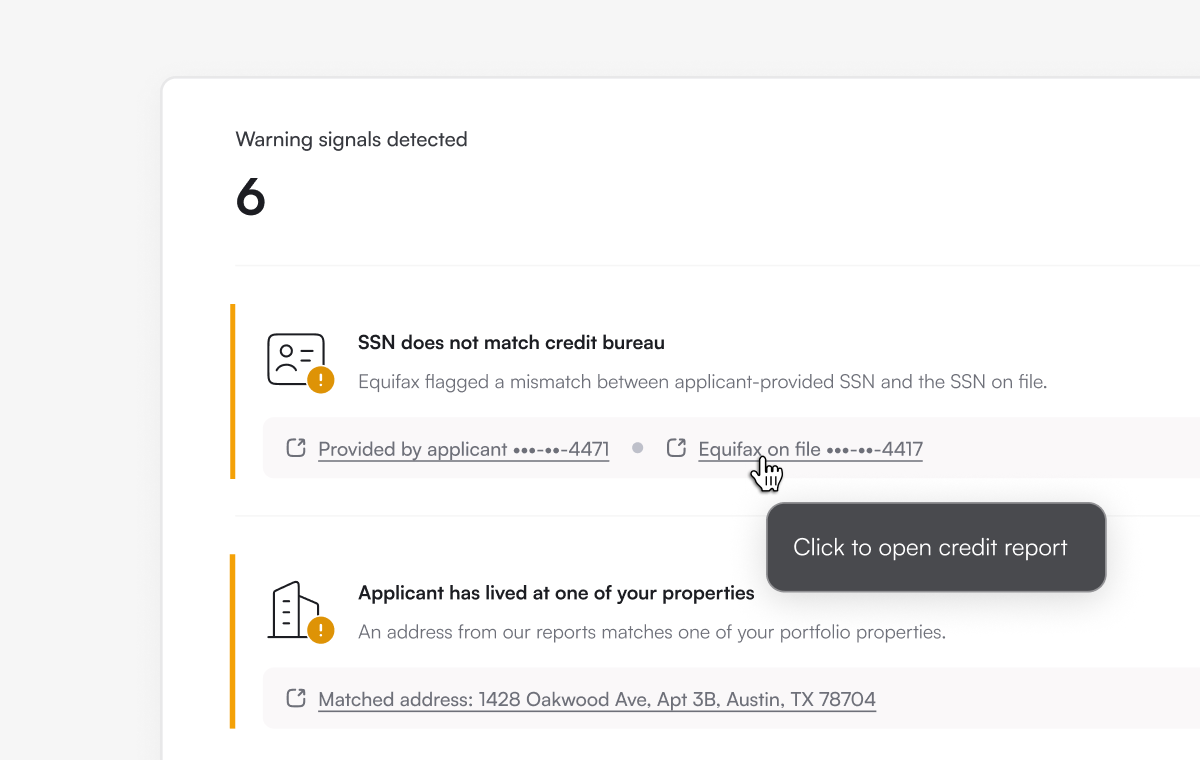
The report surfaces six kinds of signals:
- Repeat applicants and residents. It flags applicants who have lived at, or previously applied to, one of your properties. That history is context you’d want before you make an offer, and it’s easy to lose track of across a large portfolio.
- SSN mismatches. When the Social Security number an applicant provides doesn’t line up with what the credit bureaus have on file, the report calls it out. A mismatch can be an innocent typo, or something worth a closer look.
- Housing-history inconsistencies. Gaps or contradictions between what an applicant reports and what the records show, so you can ask the right follow-up questions.
- Recently established credit files. A credit profile created very recently can be perfectly legitimate, but it’s context worth having as you review the rest of the application.
- Income that doesn’t match what was self-reported. When Boom’s verified income comes back significantly different from what the applicant attested to, the report flags the discrepancy.
- Potential fraud signals in income documents. Submitted pay stubs and income documents are scanned for signs of manipulation, a common form of rental application fraud.
And this is a growing list. Boom is continually adding new warning signals, so the report keeps pace with emerging fraud tactics, with more on the way.
Why it matters
The payoff is straightforward: your team reviews faster and catches more.
Faster, because reviewers spend their time on the handful of applications that actually need scrutiny instead of reading every report end to end. More, because the signals that are easiest to miss, like a subtle SSN mismatch or a too-recent credit file, are exactly the ones the report is built to surface. And more consistently, because the same checks run on every applicant the same way, rather than depending on who happened to review the file and how much time they had that afternoon.
That consistency matters beyond efficiency. Applying the same review standard to every applicant is also good practice for fair, defensible screening. The Warnings report supports the kind of even-handed, criteria-based process that good screening is built around.
Once it’s on, each application shows how many warning signals it triggered. Open the application and select the Warnings report tab to see every signal that fired, each with a plain-language explanation and a link to the source it came from, whether that’s a flagged income document or the credit report behind an SSN mismatch. The report is timestamped and printable, so it’s easy to save with the application file.